Which CloudWorks application do I need?
CloudWorks is four applications with two kinds of user. Your administrators run the system with CloudWorks Integration (the server) and CloudWorks Console (the complete Windows application), and set loggers up on site with CloudWorks Configure (the Android app). Your clients sign in to CloudWorks Online from a browser and see the data from their own dataloggers — and administrators can use Online too, from anywhere, for everything except Bluetooth configuration. All four are supplied free of charge.
Installed software
Run the system
The people who install, configure and look after a CloudWorks system use three applications: two on Windows, installed with the CloudWorks Installer, and one on an Android phone for Bluetooth set-up at the logger.
CloudWorks Integration
The server. Every logger reports to it; it manages the MySQL databases the data goes into, and serves the REST API, Modbus TCP/IP and FTP routes.
CloudWorks Console
The complete Windows application. Configures loggers over Bluetooth at the device or remotely, manages users, firmware and communications diagnostics — and shows all the application data too.
CloudWorks Configure
The Android app. Sets a logger up over Bluetooth on site — setup, sensor tests, factory defaults and firmware — with no laptop and no signal.
In a browser
See the data, from anywhere
Your clients do not install anything. They sign in to CloudWorks Online from a browser and see the live status, charts and history of their own dataloggers — and nothing else. Sign in as an administrator and you get almost all of the Console; the one thing Online cannot do is Bluetooth configuration at the device.
One server, two kinds of user
The loggers report to CloudWorks Integration. Your administrators run the system from CloudWorks Console — or from CloudWorks Online when they are away from a Windows PC — and set loggers up at the device with CloudWorks Configure on a phone. Your clients look at their data in CloudWorks Online. Everything reads from the same server.
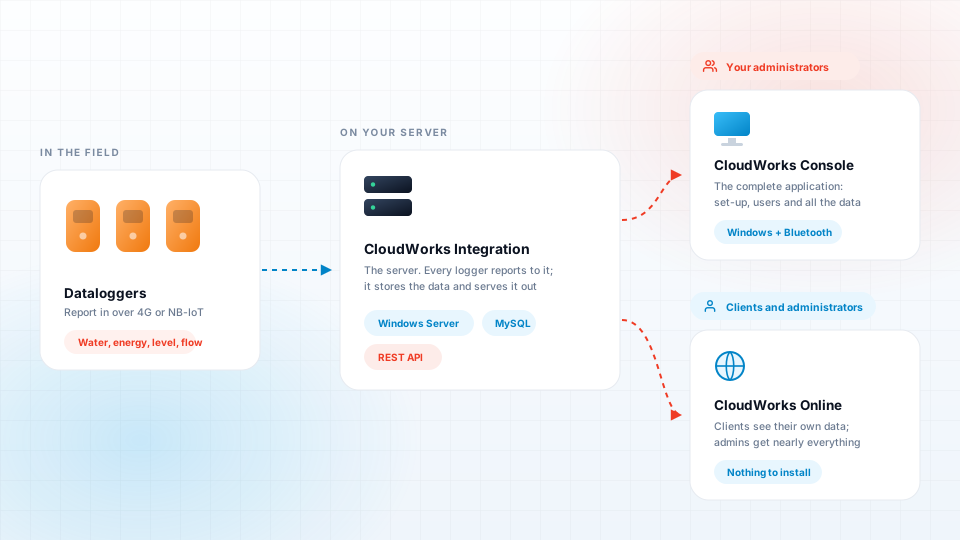
What each application does
The Console is the complete application. Online does almost all of the same from a browser; the exception is anything that needs the Bluetooth link at the device — which is exactly what Configure does, from a phone. does it
| Task | Integration | Console | Online | Configure |
|---|---|---|---|---|
| Running the system | ||||
| Collect the data from the loggers and store it in MySQL | — | — | — | |
| Serve the REST API, Modbus TCP/IP and FTP upload | — | — | — | |
| Configure a logger over Bluetooth, at the device | — | — | ||
| Upload logger firmware (over Bluetooth) | — | — | ||
| Sensor and hardware tests at the device | — | — | ||
| Configure a logger remotely | — | — | ||
| Set up and manage the databases | — | — | — | |
| Manage users and what each one may see | — | — | ||
| Communications diagnostics | — | |||
| Tank tables | — | — | ||
| Looking at the data | ||||
| Live device status, datalog charts and history | — | — | ||
| Map of logger locations | — | — | ||
| Practicalities | ||||
| Runs on | Windows Server | Windows PC | Any browser | Android phone |
| Used by | Administrators | Administrators | Clients, and administrators anywhere | Technicians on site |
| Installed by | CloudWorks Installer | CloudWorks Installer | Nothing to install | APK from this site |
Three steps, then your clients sign in
Install CloudWorks Integration on your server
Run the CloudWorks Installer on a static IP Windows server with MySQL, and set up your databases there. This is the machine every logger will report to.
Set the system up in CloudWorks Console
Install the Console on your administrators' PCs with the same installer. Configure the loggers — over Bluetooth at the device or remotely — and create the user accounts. On site, CloudWorks Configure on a phone does the Bluetooth set-up without a laptop.
Give your clients CloudWorks Online
Point CloudWorks Online at your server once, then hand each client a user code and password. They sign in from any browser and see their own dataloggers. Your administrators can sign in to the same CloudWorks Online for almost everything the Console does.
Common questions
Do my clients need to install anything?
No. CloudWorks Online runs in a browser. Your clients sign in with the user code and password you give them and see the dataloggers they have been given access to.
Can I configure a logger from CloudWorks Online?
Yes, remotely. Signed in as an administrator, CloudWorks Online gives you almost all of the Console's functionality. The one thing it cannot do is Bluetooth configuration at the device, and the firmware uploads that go over Bluetooth - those need CloudWorks Console.
Is CloudWorks Online only for clients?
No. A client sign-in shows just that client's own dataloggers, but an administrator who signs in gets almost the whole Console from any browser - useful away from a Windows PC. The Console remains the most complete application.
Which application goes on the server?
CloudWorks Integration. CloudWorks Console goes on your administrators' PCs. Both come from the same CloudWorks Installer, and both can be installed on one machine for a self-contained system.
Can my clients see each other's dataloggers?
No. Users and roles control what each person sees, so a client sees only the dataloggers they have been given access to.
Can I set a logger up without a laptop?
Yes. CloudWorks Configure is an Android app that connects to the logger over Bluetooth and covers the Console's engineering screens - setup, sensor tests, factory defaults, Bluetooth security and firmware upgrades - with no signal needed. It installs from this website, not the Play Store.
Is any of the software paid for?
No. CloudWorks Integration, CloudWorks Console, CloudWorks Online and CloudWorks Configure are all supplied free of charge, including updates.
Ready to set up a system?
Download the CloudWorks Installer for your server and your administrators, then give your clients a sign-in to CloudWorks Online.